Bing AI & Microsoft Copilot: A Complete, Human-Focused Guide to the AI Assistant of the Future
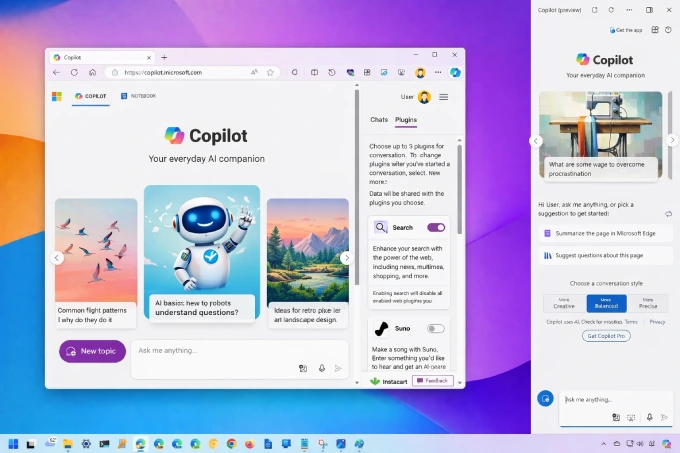
Artificial intelligence is no longer something we “wait for” in the future — it is already shaping how we search, write, learn, and work today. Among the many AI tools available, Microsoft Copilot (formerly known as Bing AI or Bing Chat) has positioned itself as one of the most practical and human-friendly AI assistants in everyday digital life.
Unlike traditional search engines or basic chatbots, Copilot is designed to think alongside you, not just respond to commands. It combines conversational AI, real-time web understanding, creativity, and productivity into a single experience — all deeply integrated with Microsoft’s ecosystem.
What Is Bing AI and How Did It Become Microsoft Copilot?
Bing AI originally started as an experiment to rethink how search engines work. Instead of giving users ten blue links, it aimed to answer questions conversationally, explain complex topics, and help users refine their thinking.
As this technology matured, Microsoft unified its AI strategy under a single name: Copilot.
Today, Copilot is:
A conversational AI assistant
A search companion
A writing and research helper
A creativity and productivity tool
Rather than replacing Bing Search, Copilot sits on top of it, enhancing search results with understanding, summaries, reasoning, and creativity.
The Technology Behind Bing AI & Copilot (Explained Simply)
At its core, Copilot is powered by advanced large language models (LLMs), developed in collaboration with OpenAI. These models are trained to understand natural language, context, tone, and intent — not just keywords.
Key Technologies Used
1. Natural Language Understanding
Copilot understands:
Full sentences
Follow-up questions
Context across a conversation
Ambiguous or incomplete queries
You don’t need to “think like a machine.” You can talk like a human.
2. Real-Time Web Awareness
Unlike static AI models, Copilot can:
Reference current information
Understand trending topics
Adapt responses based on live data
This makes it especially powerful for research, news, and learning.
3. Reasoning & Context Memory
Copilot can:
Compare options
Explain pros and cons
Break down complex subjects step by step
Remember context during a session
4. Multimodal Capabilities
Copilot isn’t limited to text. It can also:
Work with images
Generate visuals
Interpret visual content
Support voice interaction on supported platforms
Bing AI vs Traditional Search Engines
Traditional search engines are reactive. You search → you click → you read.
Copilot is interactive.
With Copilot, you can:
Ask follow-up questions naturally
Request explanations at different difficulty levels
Ask for summaries instead of reading long articles
Turn information into action (lists, plans, drafts)
This changes search from a destination into a conversation.
Core Features of Microsoft Copilot
1. Conversational Search & Research
Copilot allows you to explore topics deeply:
Ask “why,” “how,” and “what if”
Compare multiple viewpoints
Get explanations tailored to your knowledge level
This is especially valuable for students, researchers, and content creators.
2. Writing & Content Creation Support
Copilot can help you:
Draft blog posts
Rewrite paragraphs
Improve tone and clarity
Create outlines
Generate ideas and headlines
Importantly, the best results come when human judgment and editing are applied afterward.
3. Productivity & Daily Assistance
Copilot can assist with:
Email drafting
Meeting summaries
Task planning
Brainstorming workflows
Explaining documents or tables
In professional environments, this saves time rather than replacing human decision-making.
4. Creative & Visual Generation
Through integration with tools like Bing Image Creator, Copilot can:
Generate images from text
Suggest creative visual ideas
Help with branding concepts
Support marketing visuals
This makes it useful for designers, marketers, and bloggers.
Real-World Use Cases of Bing AI & Copilot
📚 Education & Learning
Copilot can explain:
Complex academic topics in simple language
Technical concepts step by step
Historical events with context
Scientific ideas using analogies
It acts more like a patient tutor than a search engine.
🧑💻 Content Creation & SEO
For website owners and marketers:
Topic research becomes faster
Outlines and drafts are easier
Meta descriptions and titles can be ideated
Content gaps can be identified
However, originality and human editing remain essential for SEO success.
💼 Business & Office Work
Copilot helps professionals:
Understand reports
Summarize long documents
Draft professional emails
Organize ideas before meetings
This turns AI into a support tool, not a replacement.
🌍 Everyday Life
From travel planning to cooking ideas, Copilot assists with:
Decision making
Comparing options
Organizing thoughts
Learning new skills casually
Supported Languages & Global Accessibility
Microsoft Copilot supports a wide range of languages, allowing global users to interact naturally.
Commonly Supported Languages Include:
English
Spanish
French
German
Italian
Portuguese
Turkish
Arabic
Japanese
Korean
Chinese
Language quality continues to improve as models evolve.
Best Practices for Using Copilot Effectively
✔️ Be Specific, Not Technical
You don’t need commands. Just explain what you want.
✔️ Ask Follow-Up Questions
Copilot performs best in conversations, not one-off prompts.
✔️ Use It as a Drafting Partner
Let Copilot generate ideas — then refine them yourself.
✔️ Always Apply Human Review
AI accelerates work; humans ensure quality, accuracy, and originality.
Is Bing AI & Copilot Safe for SEO and AdSense?
Yes — when used correctly.
Important Guidelines:
Do not publish raw AI output without editing
Add unique insights and examples
Ensure factual accuracy
Match search intent
Avoid thin or repetitive content
Search engines reward value, not whether AI was involved.
Frequently Asked Questions (FAQ) – Bing AI & Copilot
1. What is Microsoft Copilot?
Copilot is an AI assistant that combines conversational AI, search, and productivity tools into one experience.
2. Is Bing AI the same as Copilot?
Bing AI evolved into Copilot; Copilot is the broader, more advanced version.
3. Is Copilot free to use?
Basic features are available for free, with premium options in some regions.
4. Can Copilot generate images?
Yes, through integration with AI image generation tools.
5. Does Copilot replace Google Search?
No. It offers a different, conversational way to explore information.
6. Is Copilot good for students?
Yes, especially for explanations and summaries — but it should not replace learning.
7. Can Copilot write full articles?
It can draft content, but human editing is essential.
8. Is Copilot multilingual?
Yes, it supports many global languages.
9. Can Copilot understand context?
Yes, it remembers conversation flow during a session.
10. Is Copilot safe for business use?
Yes, when used responsibly and with privacy awareness.
11. Does Copilot browse the web?
It uses live search signals to ground its answers.
12. Can Copilot help with SEO?
Yes, especially for research, ideation, and drafting.
13. Is Copilot creative?
Yes — it supports storytelling, brainstorming, and visual ideas.
14. Does Copilot learn from my chats?
User privacy depends on account type and settings.
15. Will Copilot replace human jobs?
Copilot is designed to assist, not replace, human creativity and decision-making.
Final Thoughts: AI That Feels Human
Microsoft Copilot represents a shift in how we interact with technology. Instead of learning how machines think, machines are learning how humans think, ask, and explore.
When used thoughtfully, Copilot becomes:
A learning companion
A productivity booster
A creative assistant
A research partner
The future of AI isn’t about replacing people — it’s about amplifying human potential.
You should also read:
Xbox Ecosystem Explained: Games, Rewards & The Microsoft Experience
Xbox: More Than a Console, a Living Gaming Ecosystem For many people, the word Xbox brings back a very specific feeling. Maybe it’s the memory…
Continue reading...
Bing Wallpapers: Explore the World Through Daily Backgrounds
Bing Wallpapers: Bringing the World to Your Screen, One Image at a Time Enjoy daily Bing Wallpapers showcasing beautiful scenes from the US, France, Japan,…
Continue reading...
Bing Rewards: A Practical and Human Guide to Earning While You Search
Bing Rewards: Everyday Searching, With a Little Extra Value Think about how often you search the internet in a single day. Sometimes you’re looking for…
Continue reading...